#include <Robot.h>
Public Member Functions | |
| Robot (b2World *world, config::sRobot robotParameters, double posX, double posY, double angle=0) | |
| void | createBody (b2World *world, config::sRobot m_robotParameters, double posX, double posY, double angle=0) |
| void | drawBody (sf::RenderWindow &window, double m_to_pix) |
| void | drawJoint (sf::RenderWindow &window, double m_to_px) |
| void | drawGripJoint (sf::RenderWindow &window, double m_to_px) |
| void | moveBodyWithMotor () |
| void | moveBodyWithForce () |
| void | moveBodyWithImpulse () |
| void | turnOffMotor (side s) |
| void | blockMotorRotation (side s) |
| void | allowMotorRotation (side s) |
| void | limitMotorRotation (side s, double limit_angle_rad) |
| void | setState (e_state state) |
| e_state | getState () |
| b2Body * | getBody () |
| b2Body * | getWheel (side s) |
| b2PrismaticJointDef | getJointDef (side s) |
| void | grip (b2Contact *contact, b2Body *otherBody, double m_to_px) |
| void | gripGroundFromPos () |
| bool | gripSide (b2Contact *contact, b2Body *otherBody, double m_to_px) |
| bool | contactOnGripSide (b2Contact *contact) |
| void | setContact (bool contact) |
| bool | isContact () |
| void | setDelay (int delay) |
| int | getDelay () |
| bool | checkGripp (side s) |
| bool | isGrabbed () |
| int | nbJoint (side s) |
| void | incrementNbJoint (side s) |
| void | resetNbJoint (side s) |
| b2RevoluteJoint * | getMotor (side s) |
| void | destroyBody () |
| double | getBodyLength () |
| void | setSpeed (double speed) |
| bool | isReady () |
| bool | isMoving () |
| void | setId (int id) |
| int | getId () |
| b2Vec2 | getPosition () |
| double | getAngle () |
Public Attributes | |
| side | m_movingSide = RIGHT |
| bool | m_ready = false |
| bool | m_moving = false |
| bool | m_start = true |
| bool | m_pushing = false |
| bool | m_isGrabbed = false |
| double | m_referenceAngle = -PI |
| double | m_referenceAngleJoint = 0 |
| int | m_bridgeAge = 0 |
| int | m_age = 0 |
| int | m_pushing_delay = 0 |
| b2PrismaticJoint * | m_previousGripJoint = nullptr |
| b2PrismaticJoint * | m_currentGripJoint = nullptr |
Detailed Description
A Robot object is a set of physical properties (body, fixture, joints) and graphical features that describes the robot. This features are synchronized and the robot is controlled by proper member functions. Those member functions allow to control the grip creation and the robot movement at the joint level.
Member Function Documentation
◆ allowMotorRotation()
| void Robot::allowMotorRotation | ( | side | s | ) |

◆ blockMotorRotation()
| void Robot::blockMotorRotation | ( | side | s | ) |
◆ checkGripp()
| bool Robot::checkGripp | ( | side | s | ) |
◆ createBody()
| void Robot::createBody | ( | b2World * | world, |
| config::sRobot | m_robotParameters, | ||
| double | posX, | ||
| double | posY, | ||
| double | angle = 0 |
||
| ) |
Create the box2D body of the robot and attach it to the world
- Parameters
-
world box2D world defined in the main program robotParameters structure containing the robot parameters: only the body length and speed have to be defined posX,posY : initial position of the robot in this world in meters angle : initial angle of the robot in this world in rad
◆ destroyBody()
| void Robot::destroyBody | ( | ) |
◆ drawBody()
| void Robot::drawBody | ( | sf::RenderWindow & | window, |
| double | m_to_pix | ||
| ) |
◆ drawGripJoint()
| void Robot::drawGripJoint | ( | sf::RenderWindow & | window, |
| double | m_to_px | ||
| ) |
◆ drawJoint()
| void Robot::drawJoint | ( | sf::RenderWindow & | window, |
| double | m_to_px | ||
| ) |
◆ getAngle()
| double Robot::getAngle | ( | ) |

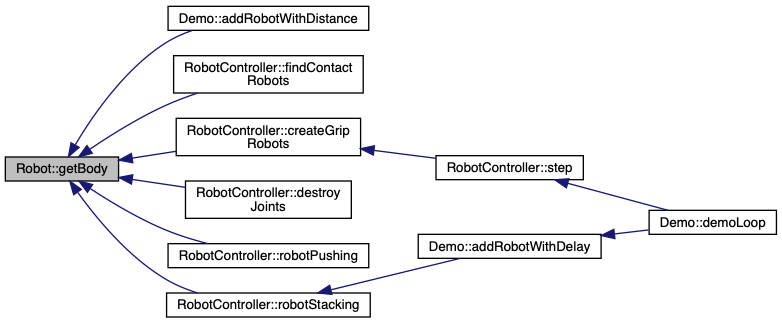
◆ getBody()
| b2Body * Robot::getBody | ( | ) |
◆ getBodyLength()
| double Robot::getBodyLength | ( | ) |
◆ getDelay()
| int Robot::getDelay | ( | ) |

◆ getId()
| int Robot::getId | ( | ) |

◆ getJointDef()
| b2PrismaticJointDef Robot::getJointDef | ( | side | s | ) |
get the box2D definition of the prismatic joint used to create the gripper, this definition can then be used to create the actual grip joint
- Parameters
-
s is the side of the robot (relative to the robot referential), can be either LEFT or RIGHT
Definition at line 1056 of file Robot.cpp.

◆ getMotor()
| b2RevoluteJoint * Robot::getMotor | ( | side | s | ) |
◆ getPosition()
| b2Vec2 Robot::getPosition | ( | ) |
Get the robot center position (located at the center of the robot body) in m respectively to the origin of the Box2D world (top left corner)
- Returns
- a b2Vec2 vector with the x and y coordinates of the robot position (m)
Definition at line 1065 of file Robot.cpp.

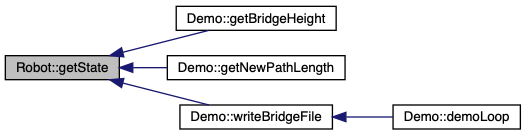
◆ getState()
| e_state Robot::getState | ( | ) |
◆ getWheel()
| b2Body * Robot::getWheel | ( | side | s | ) |
Get the Box2D body part representing one of the two wheels of the robot
- Parameters
-
s is the side of the robot (relative to the robot referential), can be either LEFT or RIGHT that define which wheel will be returned
- Returns
- a pointer on the box2D wheel on the s side
Definition at line 1072 of file Robot.cpp.

◆ grip()
| void Robot::grip | ( | b2Contact * | contact, |
| b2Body * | otherBody, | ||
| double | m_to_px | ||
| ) |
Create the grip joint definition as a Box2D prismatic joint definition object. gripGroundFromPos is used when one needs to create a static robot: It directly create the joint object without the intermediate definition.
- Parameters
-
contact box2D contact object usually obtained via the contact listener otherBody box2D body in contact with the robot m_to_px scale conversion between box2d and sfml coordinates, used to draw the contact point
update m_leftGripJointDef and m_rightGripJointDef depending on the contact side
◆ gripGroundFromPos()
| void Robot::gripGroundFromPos | ( | ) |
Create the grip joint definition as a Box2D prismatic joint definition object. gripGroundFromPos is used when one needs to create a static robot: It directly create the joint object without the intermediate definition.
- Parameters
-
contact box2D contact object usually obtained via the contact listener otherBody box2D body in contact with the robot m_to_px scale conversion between box2d and sfml coordinates, used to draw the contact point
update m_leftGripJointDef and m_rightGripJointDef depending on the contact side
◆ gripSide()
| bool Robot::gripSide | ( | b2Contact * | contact, |
| b2Body * | otherBody, | ||
| double | m_to_px | ||
| ) |
Create the grip joint definition as a Box2D prismatic joint definition object. gripGroundFromPos is used when one needs to create a static robot: It directly create the joint object without the intermediate definition.
- Parameters
-
contact box2D contact object usually obtained via the contact listener otherBody box2D body in contact with the robot m_to_px scale conversion between box2d and sfml coordinates, used to draw the contact point
update m_leftGripJointDef and m_rightGripJointDef depending on the contact side
Definition at line 641 of file Robot.cpp.


◆ incrementNbJoint()
| void Robot::incrementNbJoint | ( | side | s | ) |

◆ isContact()
| bool Robot::isContact | ( | ) |

◆ isGrabbed()
| bool Robot::isGrabbed | ( | ) |

◆ isMoving()
| bool Robot::isMoving | ( | ) |

◆ isReady()
| bool Robot::isReady | ( | ) |
◆ limitMotorRotation()
| void Robot::limitMotorRotation | ( | side | s, |
| double | limit_angle_rad | ||
| ) |
Limit the motor rotation between +/- a given limit angle around the reference angle. The reference angle is defined by the member attribute m_referenceAngleJoint
- Parameters
-
s is the motor side can take LEFT or RIGHT value limit_angle_rad is the value that define the limit angle in rad
◆ moveBodyWithForce()
| void Robot::moveBodyWithForce | ( | ) |
Second of the three different methods to move the robot body in the clockwise direction, The parameters might need to be adapted to fit the simulation parameters (object size, scale, weight...) The speed is applied via the m_angularSpeed class member (except for the force The impulse method uses a proportional action to reach the angular target speed
Definition at line 470 of file Robot.cpp.

◆ moveBodyWithImpulse()
| void Robot::moveBodyWithImpulse | ( | ) |
Third of the three different methods to move the robot body in the clockwise direction, The parameters might need to be adapted to fit the simulation parameters (object size, scale, weight...) The speed is applied via the m_angularSpeed class member (except for the force The impulse method uses a proportional action to reach the angular target speed
Definition at line 495 of file Robot.cpp.

◆ moveBodyWithMotor()
| void Robot::moveBodyWithMotor | ( | ) |
First of the three different methods to move the robot body in the clockwise direction, This is the one used in the current implementation, the other two functions are alternative way to move the body but are currently not used The speed is applied via the m_angularSpeed class member (except for the force The impulse method uses a proportional action to reach the angular target speed
◆ nbJoint()
| int Robot::nbJoint | ( | side | s | ) |

◆ resetNbJoint()
| void Robot::resetNbJoint | ( | side | s | ) |

◆ setContact()
| void Robot::setContact | ( | bool | contact | ) |

◆ setDelay()
| void Robot::setDelay | ( | int | delay | ) |

◆ setId()
| void Robot::setId | ( | int | id | ) |
◆ setSpeed()
| void Robot::setSpeed | ( | double | speed | ) |
◆ setState()
| void Robot::setState | ( | e_state | state | ) |

◆ turnOffMotor()
| void Robot::turnOffMotor | ( | side | s | ) |
Member Data Documentation
◆ m_previousGripJoint
| b2PrismaticJoint* Robot::m_previousGripJoint = nullptr |
The documentation for this class was generated from the following files: